Subsections of CrowdStrike Cloud Security
Overview
This AWS Built-In (ABI) solution deploys CrowdStrike integrations for AWS Organizations on the AWS Cloud. It’s for IT administrators and security professionals who want to provide endpoint protection, container image assessment, and EKS cluster security across multiple AWS accounts.
Deploying this ABI solution doesn’t guarantee an organization’s compliance with any laws, certifications, policies, or other regulations.
Protect endpoints with an intelligent, lightweight agent that consolidates point products and stops advanced attacks — both malware and malware-free — while capturing rich endpoint activity for industry-leading detection and response.
Assess container images in Amazon ECR for vulnerabilities and malware before deployment, helping ensure only secure images are used in your environment.
Secure your Amazon EKS clusters with runtime protection that monitors for suspicious activities and provides visibility into containerized workloads.
Get started by registering your AWS accounts with CrowdStrike. When registering, CrowdStrike is granted limited read-only access to your cloud account. When deploying this ABI solution, all accounts in that organization are registered automatically.
AWS Marketplace listing
CrowdStrike Falcon Cloud Security
Next: Choose Terminologies.
Terminologies
- ABI : AWS Built-In (ABI).
- ABI modules : The GitHub repositories based on AWS Security Reference Architecture (AWS SRA). Modules provide templates for enabling AWS foundational services such as AWS CloudTrail, Amazon GuardDuty, AWS Security Hub, etc.
- ABI solutions : The GitHub repositories built by partners in collaboration with AWS. While building these solution, partners use ABI modules to enable AWS services as needed before creating partner-specific assets. The solution contains (1) Infrastructure as Code (IaC) templates to automate enablement of both AWS and partner services, and (2) wrappers for most common formats such as CfCT manifest, AWS Service Catalog baselines, and more, so customers can pick and choose from the available services.
- CrowdStrike API client: CrowdStrike Falcon API client authentication credentials for interaction with CrowdStike APIs via OAuth 2.0 token. Includes an API client ID and API client secret.
- CrowdStrike event bus: The AWS event bus in CrowdStrike’s environment for receiving events from EKS clusters and providing runtime protection data to CrowdStrike.
- ECR Registry Connections: Integration that enables CrowdStrike to assess container images stored in Amazon Elastic Container Registry (ECR) for vulnerabilities and malware.
- EKS Protection: Runtime security monitoring for Amazon Elastic Kubernetes Service clusters that detects suspicious activities and provides visibility into containerized workloads.
- SSM Distributor: Install the Falcon sensor on instances across your AWS accounts using AWS SSM State Manager Associations.
Next: Choose Cost and licenses.
Cost and Licenses
CrowdStrike Falcon cost and licenses
AWS service cost
In addition to the CrowdStrike Falcon cost, consider costs associated with the AWS services you choose and the scale of your operations. AWS services such as EventBridge, CloudTrail, Lambda, Amazon S3, and AWS Key Management Service (AWS KMS) may have associated costs.
ABI cost and licenses
Using ABI doesn’t incur additional charges. You are charged only for the resources that ABI consumes. If other ABI licenses are required for your specific use case, obtain those separately.
ABI License
Next: Choose How it Works.
How it Works
SSM Distributor
If your AWS environment uses AWS Systems Manager (SSM), you can leverage it to deploy the Falcon sensor to your EC2 instances automatically via State Manager Associations. The same CrowdStrike Falcon Distributor Package that enables 1Click, can also be deployed against instances in your environment without clicking through the Falcon Console. See GitHub Documentation for details.
This solution allows you to easily set up the necessary State Manager Associations in each region of each account in the AWS Organization.
This is accomplished by
- IAM Role in each account to provide execution role for State Manager Assocations
- State Manager Association in each region of each account to execute the CrowdStrike Falcon Distributor package against SSM Managed EC2 instances. The Association can be configured with a schedule and will handle both Linux and Windows machines.
- Secrets Manager Secret in each region of each account to store Falcon API Credentials for the CrowdStrike Falcon Distributor package.
Note: This feature will only apply to SSM-Managed EC2 Instances. See AWS Documentation for details.
EKS Protection
If your AWS environment uses EKS to run Kubernetes workloads, you can automatically deploy the Falcon Operator and Falcon sensor to each EKS Cluster. This solution will automically deploy Falcon to existing clusters as well as new clusters upon creation.
This is accomplished by
- IAM Roles in each account to provide permissions to List Clusters and create EKS Access Entries.
- EventBridge rules in each region of each account to trigger on CreateCluster events.
- IAM Roles in root account to facilitate permissions for EventBridge, Lambda and CodeBuild.
- Lambda function to list EKS clusters and invoke codebuild for initial deployment of Falcon to existing clusters.
- Lambda function to be triggered by CreateCluster and invoke codebuild against new clusters.
- CodeBuild project to update access entries, pull CrowdStrike images and deploy Falcon Operator/Sensor.
ECR Registry Connections
Ensuring that the images in the registry are assessed for vulnerabilities before runtime is an important part of cloud workload protection. When a new registry connection is added, a job starts to discover all the repositories, and in parallel, the images and tags are collected from each repository to create the catalog. The catalog contains info about all images, the repository they come from, the image tag associated with that image, and the registry it belongs to. The catalog is used to compare the future and current state of the repo. We avoid showing duplicate image info by using the catalog info, including when tags move between images, to determine if we have already seen and assessed an image. When a catalog is created for a registry, the images in the catalog are inventoried.
This is accomplished by
- IAM Roles in each account to provide permissions to push images to CrowdStrike Falcon.
- Lambda function in each account to register ECR Registries with Registry Connection service.
Note: This will connect registries in each AWS Account of the org, for each region.
Next: Choose Architecture.
Architecture
Deploying this ABI solution with default parameters builds the following architecture.
SSM Distributor
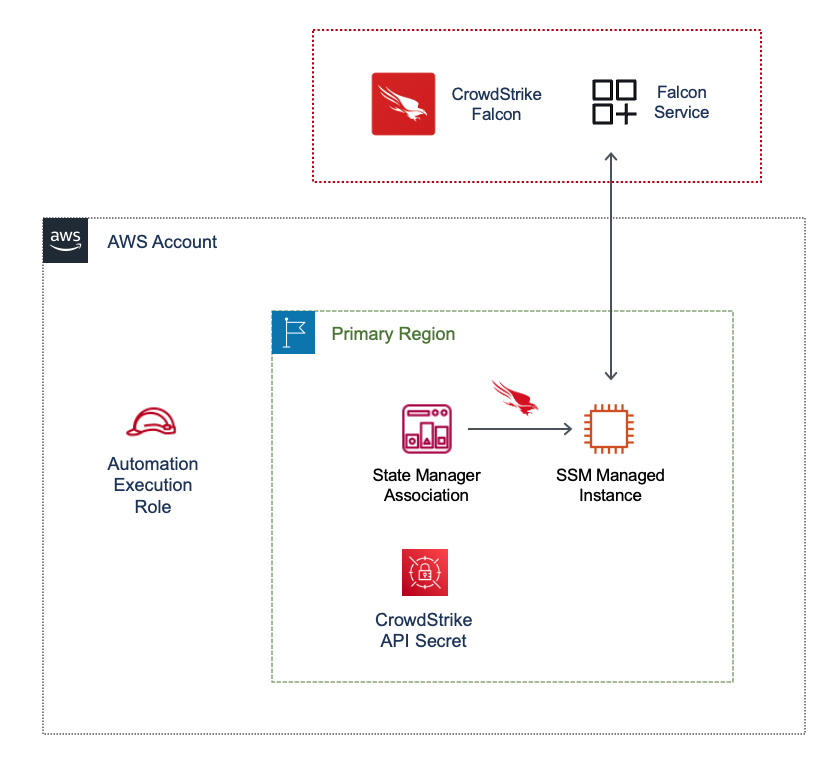
- In the child AWS accounts:
- Secrets Manager Secret to manage CrowdStrike API Credentials.
- IAM role that allows SSM Associations to retrieve API Credentials from Secrets Manager.
- SSM Associations to deploy Falcon Sensor via SSM Distributor Package against SSM-Managed instances.
EKS Protection
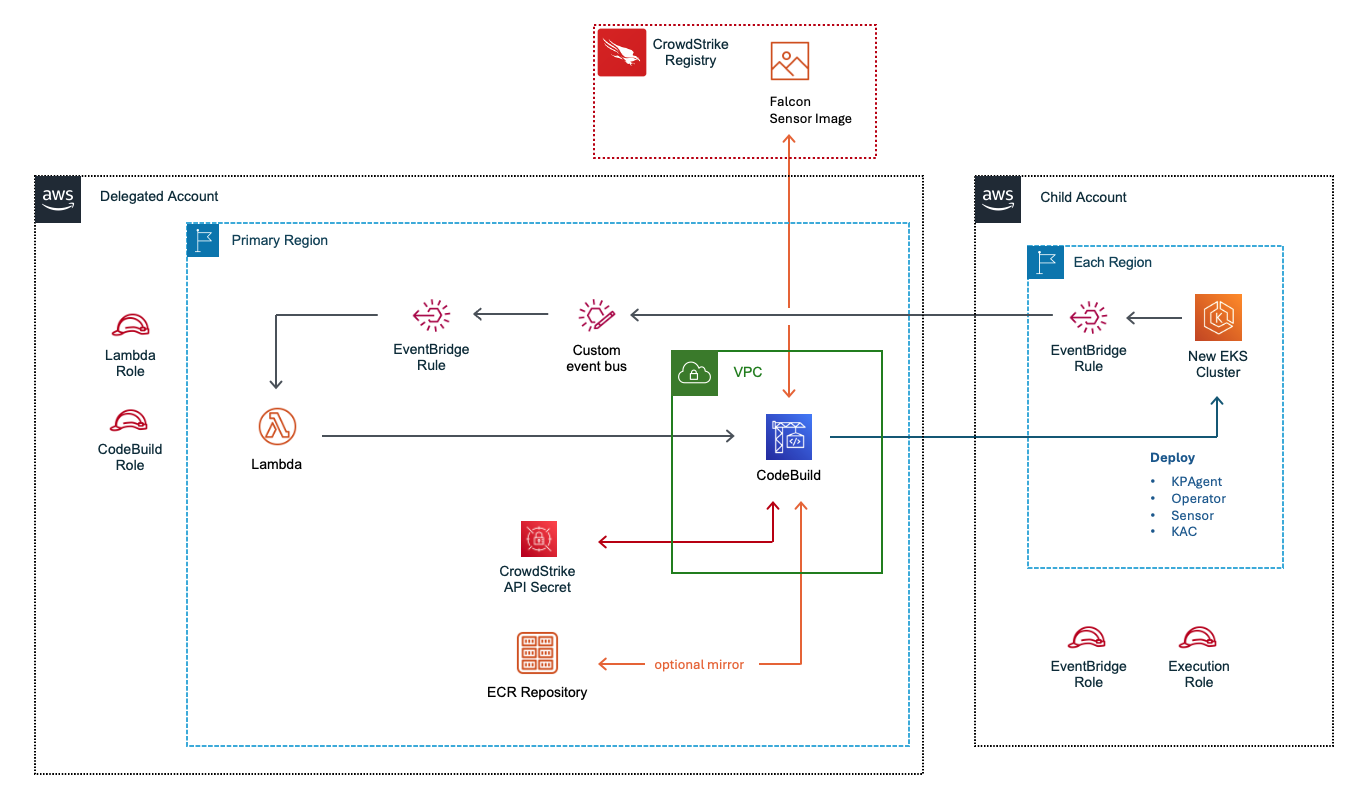
- If you enable EKS Protection:
- In the centralized account:
- IAM Role for EventBridge to trigger Lambda
- IAM Role for Lambda Execution
- IAM Role for CodeBuild Execution
- EventBus to receive cluster events
- EventBridge Rule to trigger Lambda
- Lambda functions to process cluster events and trigger Codebuild
- CodeBuild project to apply Falcon Operator to EKS Clusters
- Secret to store Falcon API key
- Optional ECR repositories if registry = ecr
- VPC, NAT, EIP for CodeBuild project
- In the child accounts:
- IAM Role for EventBridge to trigger Lambda
- IAM Role for Lambda Execution
- IAM Role for CodeBuild Execution
- EventBridge Rule to send cluster events to centralized EventBus
ECR Registry Connections
- If you enable ECR Registry Connections:
- In the primary region of all child accounts:
- IAM Role for ECR Registry Connection Scanning
- Lambda Function to register each AWS Region with Registry Connection Service
- IAM Role for Lambda Execution
- Secret for storing Falcon API Credentials
Next: Choose Deployment options.
Deployment options
Deployment options supported by this ABI solution
The following deployment options are supported by this ABI solution:
Cloud types supported by this solution
You may use this solution to register the following account types:
- Register Commercial AWS Accounts with Commercial Falcon (us1, us2, eu1)
- Register Commercial AWS Accounts with GovCloud Falcon (usgov1, usgov2)
- Register GovCloud AWS Accounts with GovCloud Falcon (usgov1, usgov2)
Note: When registering Commercial AWS with GovCloud Falcon, this solution must be launched in us-east-1
Optional CloudTrail
This solution can deploy a CloudTrail for you AWS Organization.
- Create Default Organization CloudTrail: This optional trail is required if you do not have an Organization CloudTrail enabled for you AWS Organization.
Next: Choose Predeployment steps.
Predeployment steps
Before deploying this ABI solution, complete the following steps:
- Subscribe to the CrowdStrike Falcon Cloud Security AWS Marketplace listing.
- Create Crowdstrike API Client in Falcon UI with the following scope:
- Sensor management: Read and Write (If Sensor Management enabled)
- Installation Tokens: Read, Sensor Download: Read (If Sensor Management or SSM Distributor enabled)
- ECR Registry Scanning: Read and Write (If ECR Registry Connections enabled)
- Falcon Images Download: Read (If EKS Protection enabled)
- Sensor Download: Read (If EKS Protection enabled)
- Become familiar with the additional resources later in this guide.
Next: Choose Deployment steps.
Deployment steps
Option 1: Launch the CloudFormation template in the AWS Organizations management account
-
Download the CloudFormation template.
-
Launch the CloudFormation template in your AWS Control Tower home Region.
- Stack name:
template-crowdstrike-enable-integrations
- Update the following parameters as needed:
- Falcon CID Details
- Falcon Account Type: Your Falcon Cloud type. Allowed values include
commercial or govcloud
- Falcon API Client ID: Your CrowdStrike Falcon API Client ID
- Falcon API Secret: Your CrowdStrike Falcon API Client Secret
- CrowdStrike Cloud: Your Falcon Cloud region. Allowed values include:
us1, us2, eu1, usgov1, usgov2
- Secrets Manager Secret Name: Name of the Secrets Manager Secret that will store the Falcon API Credentials.
- AWS Org Details
Note: if
Falcon Account Type = govcloud and AWS Account Type = commercial, then you must launch this solution in us-east-1
- AWS Account Type: Your AWS Cloud type. Allowed values include
commercial or govcloud
- Delegated Administrator Account: Indicates whether this is a Delegated Administrator account. Allowed values include
true or false. Default is false
- Deployment Scope: Comma Delimited List of AWS OU(s) to provision. If you are provisioning the entire organization, please enter the Root OU
r-******
- Permissions Boundary Policy Name: If your Organization requires a PermissionsBoundary policy applied to IAM Roles, enter the Name (not the ARN) of your Permissions Boundary policy
- Deploy Falcon Sensors with SSM Distributor
- EnableSSMDistributor: Whether to deploy SSM Associations in each AWS Region to automatically deploy the CrowdStrike Distributor Package against SSM-Managed Ec2 Instances. Allowed values include
true or false. The default is false
- Document Version: If EnableSSMDistributor is
true: Define the version of the CrowdStrike SSM Automation document. The default is 2. This value should not change unless advised by CrowdStrike.
- SSM Execution Role: If EnableSSMDistributor is
true: Define the name of the SSM Automation Execution Role. The default is crowdstrike-distributor-deploy-role
- Apply Only At Cron Interval: If EnableSSMDistributor is
true: Whether to wait for cron interval to initiate SSM Distributor installation. Allowed values include true or false. The default is false
- Cron Schedule Expression: If EnableSSMDistributor is
true: Define the schedule or rate by which the SSM Automation runs. The default is cron(0 0 */1 * * ? *) (runs every hour)
- Max Errors Allowed: If EnableSSMDistributor is
true: The number or percent of errors that are allowed before the system stops sending requests to run the association on additional targets. The default is 10%
- Max Concurrency Allowed: If EnableSSMDistributor is
true: The maximum number or percent of targets allowed to run the association at the same time. The default is 20%
- ECR Registry Connections
- Enable ECR Connections for Image Assessment: Whether to set up ECR Registry Connections for Image Assessments
- ECR Execution Role Name: The name of the role that will be used for Lambda execution.
- ECR Lambda Function Name: The name of the lambda function used to register ECR registry connections.
- Advanced Configuration Properties
- Source S3 Bucket Name: Name of the S3 Bucket for staging files. The default is
aws-abi-${AWS::AccountId}-${AWS::Region}
- S3 Bucket Region: Region of the S3 Bucket for staging files.
- Source S3 Bucket Name Prefix: Prefix of the S3 Bucket for sourcing files. Do not change the default value.
- EKS Protection
- EKSProtection: Enable CrowdStrike EKS Protection to automatically deploy Falcon Sensor against EKS Clusters. Allowed values include
true or false. Default is false
- FalconCID: Your CrowdStrike Falcon CID with checksum. (eg. ********************************-ab)
- DockerAPIToken: Your Falcon Docker API Token
- OrganizationId: Your AWS Organization ID (eg. o-********)
- EventBusName: Name of the centralized EventBus. Default is
crowdstrike-eks-eventbus
- EventBridgeRoleName: Name of the EventBridge IAM role. Default is
crowdstrike-eks-eventbridge-role
- EKSExecutionRoleName: Name of the Target Execution IAM role. Default is
crowdstrike-eks-execution-role
- CodeBuildRoleName: Name of the CodeBuild IAM role. Default is
crowdstrike-eks-codebuild-role
- CodeBuildProjectName: Name of the CodeBuild Project. Default is
crowdstrike-eks-codebuild
- KubernetesUserName: Name of the Kubernetes UserName. Default is
crowdstrike-eks
- Registry: Source Falcon Image from CrowdStrike or mirror to ECR. Allowed values are
crowdstrike or ecr. Default is crowdstrike
- Backend: kernel or bpf for Daemonset Sensor. Allowed Values are
kernel or bpf. Default is kernel
- EnableKAC: Deploy Kubernetes Admission Controller (KAC). For more info see https://falcon.crowdstrike.com/documentation/page/aa4fccee/container-security#s41cbec3
-
Select both of the following capabilities and choose Submit to launch the stack.
[] I acknowledge that AWS CloudFormation might create IAM resources with custom names.
[] I acknowledge that AWS CloudFormation might require the following capability: CAPABILITY_AUTO_EXPAND
Wait for the CloudFormation status to change to CREATE_COMPLETE state.
Option 2: Launch using Customizations for Control Tower
Customizations for AWS Control Tower (CfCT) combines AWS Control Tower and other AWS services to help you set up an AWS environment. You can deploy the templates provided with the ABI solution using CfCT.
Prerequisites
Create an IAM role with the required permissions in the AWS management account to allow the CfCT solution to launch resources.
How it works
To deploy the sample partner integration page, add the following blurb to the manifest.yaml file from your CfCT solution and update the account and organizational unit (OU) names as needed.
resources:
  - name: deploy-crowdstrike-init-stack
    resource_file: https://aws-abi.s3.us-east-1.amazonaws.com/cfn-abi-crowdstrike-fcs/templates/crowdstrike_init_stack.yaml
    deploy_method: stack_set
    parameters:
      - parameter_key: FalconClientID
        parameter_value: $[alfred_ssm_/crowdstrike/falcon_client_id] # Create SSM parameter with the CrowdStrike API client ID
      - parameter_key: FalconSecret
        parameter_value: $[alfred_ssm_/crowdstrike/falcon_secret] # Create SSM parameter with the CrowdStrike API secret
      - parameter_key: ProvisionOU
        parameter_value: $[alfred_ssm_/crowdstrike/provision-ou] # Create SSM parameter with the OU name
      - parameter_key: SourceS3BucketName
        parameter_value: aws-abi
      - parameter_key: S3BucketRegion
        parameter_value: us-east-1 # Update as needed
    regions:
      - us-east-1 # Update as needed
    deployment_targets:
      accounts:
        - [[MANAGEMENT-AWS-ACCOUNT-ID]]
Next: Choose Post deployment options.
GovCloud Deployment steps
Step 1: Download and prepare the contents of this solution
- Download the contents of the GitHub Repo
- Navigate to the downloaded directory and run the source_prep.py script
- Confirm the following directory and files were created
- cfn-abi-crowdstrike-fcs/lambda_functions/packages/codebuild/lambda.zip
- cfn-abi-crowdstrike-fcs/lambda_functions/packages/cw-helper/lambda.zip
- cfn-abi-crowdstrike-fcs/lambda_functions/packages/ecr-registration/lambda.zip
- cfn-abi-crowdstrike-fcs/lambda_functions/packages/eks-existing-clusters/lambda.zip
- cfn-abi-crowdstrike-fcs/lambda_functions/packages/eks-new-clusters/lambda.zip
- cfn-abi-crowdstrike-fcs/lambda_functions/packages/register-organization-v2/lambda.zip
- cfn-abi-crowdstrike-fcs/templates/crowdstrike_init_stack.yaml
- cfn-abi-crowdstrike-fcs/templates/ecr-registration-stackset.yml
- cfn-abi-crowdstrike-fcs/templates/eks-eventbridge-stackset.yml
- cfn-abi-crowdstrike-fcs/templates/eks-protection-stack.yml
- cfn-abi-crowdstrike-fcs/templates/eks-root-roles.yml
- cfn-abi-crowdstrike-fcs/templates/eks-target-roles-stackset.yml
- cfn-abi-crowdstrike-fcs/templates/ssm-association-stackset.yml
- cfn-abi-crowdstrike-fcs/templates/ssm-setup-stackset.yml
Step 2: Upload prepared contents to your S3 Bucket
- In your AWS Console, navigate to the root of an S3 bucket
- Click Upload
- Click Add Folder
- Select the new
cfn-abi-crowdstrike-fcs directory.
- Note: this directory may have the same name of the repo you downloaded. Please ensure you are selecting the
cfn-abi-crowdstrike-fcs directory which contains only the folders and files created by the source_prep.py script in the previous step.
- Click Upload
Step 3: Launch the CloudFormation template in the AWS Organizations management account
-
Launch the CloudFormation template in your AWS Control Tower home Region.
- Stack name:
template-crowdstrike-enable-integrations
- Update the following parameters as needed:
-
Falcon CID Details
- Falcon Account Type: Your Falcon Cloud type. Select
govcloud
- Falcon API Client ID: Your CrowdStrike Falcon API Client ID
- Falcon API Secret: Your CrowdStrike Falcon API Client Secret
- CrowdStrike Cloud: Your Falcon Cloud region. Allowed values include: Select
usgov1 or usgov2
- Secrets Manager Secret Name: Name of the Secrets Manager Secret that will store the Falcon API Credentials.
-
AWS Org Details
- AWS Account Type: Your AWS Cloud type. Select
govcloud
- Delegated Administrator Account: Indicates whether this is a Delegated Administrator account. Allowed values include
true or false. Default is false
- Deployment Scope: Comma Delimited List of AWS OU(s) to provision. If you are provisioning the entire organization, please enter the Root OU
r-******
- Permissions Boundary Policy Name: If your Organization requires a PermissionsBoundary policy applied to IAM Roles, enter the Name (not the ARN) of your Permissions Boundary policy
-
Deploy Falcon Sensors with SSM Distributor Skip, this is not supported in GovCloud yet
- EnableSSMDistributor: Whether to deploy SSM Associations in each AWS Region to automatically deploy the CrowdStrike Distributor Package against SSM-Managed Ec2 Instances. Allowed values include
true or false. The default is false
- Document Version: If EnableSSMDistributor is
true: Define the version of the CrowdStrike SSM Automation document. The default is 2. This value should not change unless advised by CrowdStrike.
- SSM Execution Role: If EnableSSMDistributor is
true: Define the name of the SSM Automation Execution Role. The default is crowdstrike-distributor-deploy-role
- Apply Only At Cron Interval: If EnableSSMDistributor is
true: Whether to wait for cron interval to initiate SSM Distributor installation. Allowed values include true or false. The default is false
- Cron Schedule Expression: If EnableSSMDistributor is
true: Define the schedule or rate by which the SSM Automation runs. The default is cron(0 0 */1 * * ? *) (runs every hour)
- Max Errors Allowed: If EnableSSMDistributor is
true: The number or percent of errors that are allowed before the system stops sending requests to run the association on additional targets. The default is 10%
- Max Concurrency Allowed: If EnableSSMDistributor is
true: The maximum number or percent of targets allowed to run the association at the same time. The default is 20%
-
ECR Registry Connections
- Enable ECR Connections for Image Assessment: Whether to set up ECR Registry Connections for Image Assessments
- ECR Execution Role Name: The name of the role that will be used for Lambda execution.
- ECR Lambda Function Name: The name of the lambda function used to register ECR registry connections.
-
Important
-
Advanced Configuration Properties
- Source S3 Bucket Name: Name of the S3 Bucket you used to upload the contents.
- S3 Bucket Region: Region in which this S3 Bucket resides. ie.
us-gov-west-1 or us-gov-east-1
- Source S3 Bucket Name Prefix: Prefix of the S3 Bucket for sourcing files. Do not change the default value.
-
EKS Protection Skip, this is not supported in GovCloud yet
- EKSProtection: Enable CrowdStrike EKS Protection to automatically deploy Falcon Sensor against EKS Clusters. Allowed values include
true or false. Default is false
- FalconCID: Your CrowdStrike Falcon CID with checksum. (eg. ********************************-ab)
- DockerAPIToken: Your Falcon Docker API Token
- OrganizationId: Your AWS Organization ID (eg. o-********)
- EventBusName: Name of the centralized EventBus. Default is
crowdstrike-eks-eventbus
- EventBridgeRoleName: Name of the EventBridge IAM role. Default is
crowdstrike-eks-eventbridge-role
- EKSExecutionRoleName: Name of the Target Execution IAM role. Default is
crowdstrike-eks-execution-role
- CodeBuildRoleName: Name of the CodeBuild IAM role. Default is
crowdstrike-eks-codebuild-role
- CodeBuildProjectName: Name of the CodeBuild Project. Default is
crowdstrike-eks-codebuild
- KubernetesUserName: Name of the Kubernetes UserName. Default is
crowdstrike-eks
- Registry: Source Falcon Image from CrowdStrike or mirror to ECR. Allowed values are
crowdstrike or ecr. Default is crowdstrike
- Backend: kernel or bpf for Daemonset Sensor. Allowed Values are
kernel or bpf. Default is kernel
- EnableKAC: Deploy Kubernetes Admission Controller (KAC). For more info see https://falcon.crowdstrike.com/documentation/page/aa4fccee/container-security#s41cbec3
-
Select both of the following capabilities and choose Submit to launch the stack.
[] I acknowledge that AWS CloudFormation might create IAM resources with custom names.
[] I acknowledge that AWS CloudFormation might require the following capability: CAPABILITY_AUTO_EXPAND
Wait for the CloudFormation status to change to CREATE_COMPLETE state.
Next: Choose Post deployment options.
Postdeployment options
Verifying the solution functionality
Verify SSM Distributor Package deployments in CrowdStrike Falcon console
- Sign in to the CrowdStrike Falcon console.
- Navigate to Host setup and management > Host management.
- Verify that your AWS Instances begin to appear in the host management list with a Host status of “Online”.
- After waiting several minutes, choose Refresh to retrieve the latest host status.
Verify ECR Registry Connections in CrowdStrike Falcon console
- Sign in to the CrowdStrike Falcon console.
- Navigate to Cloud Security > Image Assessment > Registry Connections.
- Verify that your AWS ECR registries appear in the registry connections list with a Status of “Connected”.
- After waiting several minutes, choose Refresh to retrieve the latest registry status.
Verify EKS Protection deployments in CrowdStrike Falcon console
If you enabled EKS Protection:
- Sign in to the CrowdStrike Falcon console.
- Navigate to Cloud Security > Kubernetes Protection > Clusters.
- Verify that your EKS clusters appear with sensors deployed.
- After waiting several minutes, choose Refresh to retrieve the latest cluster status.
Create change set for bug fixes and other updates
- Download the latest main template here.
- Sign in to the AWS Account in which you deployed the main stack for this solution.
- Navigate to
CloudFormation > Stacks
- Select the main stack for this solution.
- Click
Stack Actions > create change set
- Select
Replace existing template and Upload a template file.
- Upload the latest template you downloaded in step 1.
- Click
next.
- Leave all parameters the same and click
next.
- Check the boxes under
Capabilities and click next.
- Click
submit.
- Once the change set is generated, click
Execute.
Next: Choose Test the deployment.
Test the deployment
Test SSM Distributor
To test the functionality of SSM Distributor sensor deployment:
Step 1: Verify SSM Associations
- In the AWS Console, navigate to AWS Systems Manager > Node Management > State Manager.
- Verify that the CrowdStrike Falcon Distributor associations are present and have successfully executed.
- Check the association execution history to ensure successful deployments.
Step 2: Verify Host Registration
- In the Falcon console, navigate to Host setup and management > Host management.
- Verify that your AWS EC2 instances appear in the host management list with a Host status of “Online”.
- Check that the sensor version and last seen timestamp are recent.
Test ECR Registry Connections
To test the functionality of ECR Registry Connections:
Step 1: Verify Registry Connection
- In the Falcon console, navigate to Cloud Security > Image Assessment > Registry Connections.
- Verify that your AWS ECR registries appear with a Status of “Connected”.
- Check that the last scanned timestamp is recent.
Step 2: Push a Test Image
- Push a container image to one of your connected ECR repositories.
- Wait a few minutes for the image to be scanned.
- Navigate to Cloud Security > Image Assessment > Images to verify the image appears and has been assessed.
Test EKS Protection
To test the functionality of EKS Protection (if enabled):
Step 1: Create a Test EKS Cluster
- Create a new EKS cluster in one of your AWS accounts.
- Wait for the cluster creation event to trigger the automated deployment process.
Step 2: Verify Sensor Deployment
- In the Falcon console, navigate to Cloud Security > Kubernetes Protection > Clusters.
- Verify that your EKS cluster appears with sensors deployed.
- Check that the cluster status shows as protected.
Step 3: Verify Existing Clusters
- For existing EKS clusters, verify they also appear in the Kubernetes Protection dashboard.
- Check that the Falcon Operator and sensors have been deployed to existing clusters.
Next: Choose Additional Resources to get started.
Additional resources
Partner documentation
AWS services
Frequently asked questions (FAQs)
Other documentation
Next: Choose Troubleshooting.
Troubleshooting
General Troubleshooting
For troubleshooting issues with Falcon Cloud Security, submit a ticket on the CrowdStrike support portal.
For troubleshooting common ABI issues, refer to the ABI Reference Guide and Troubleshooting CloudFormation.
SSM Distributor
- Check the execution logs for the SSM State Manager Association. See SSM Documentation.
EKS Protection
- Check the Lambda logs in CloudWatch Logs for
crowdstrike-abi-eks-init-function and crowdstrike-abi-eks-events-function.
- Check the CodeBuild Execution logs for
crowdstrike-eks-codebuild.
- Check the Falcon Operator logs on the cluster. See Operator Troubleshooting.
ECR Registry Connections
See falcon documentation for detailed troubleshooting information here.
Next: Choose Feedback.
Feedback
To submit feature ideas and report bugs, use the Issues section of the [GitHub repository. To submit code, refer to the AWS Built-in Reference Guide. To submit documentation feedback, use the following GitHub links:
Next: Choose Notices.
Cleanup instructions
Remove Falcon Sensors deployed by SSM Distributor
- Before deleting any stacks, first update the main template with the following change:
# Create SSM Distributor Associations
  AssociationStackSet:
    Type: 'AWS::CloudFormation::StackSet'
    Condition: CreateSSMAssociations
    Properties:
      StackSetName: CrowdStrike-Cloud-SSM-Associations-Stackset
      Description: Create SSM State Manager Association to automatically manage Falcon Sensor installation across SSM Managed Instances
      PermissionModel: SERVICE_MANAGED
      CallAs: !If [ IsDelegatedAdmin, 'DELEGATED_ADMIN', 'SELF' ]
      ManagedExecution:
        Active: true
      Parameters:
        - ParameterKey: DocumentVersion
          ParameterValue: !Ref DocumentVersion
        - ParameterKey: SecretsManagerSecretName
          ParameterValue: !Ref SecretsManagerSecretName
        - ParameterKey: SecretStorageMethod
          ParameterValue: 'SecretsManager'
        - ParameterKey: Action
          ParameterValue: 'Install'  <<Change to 'Uninstall'
- Update the main stack, uploading the new version of the template.
- This will update the ‘action’ on all State Manager Associations to ‘Uninstall’ and execute.
- Wait until all associations have completed their Uninstall executions.
Remove Falcon Sensor deployed by EKS Protection
EKS Protection leverages the Falcon Operator, as such to remove any sensors deployed via this method please follow the uninstall steps for each cluster here.
Cleanup instructions
The following must be completed before attempting to redeploy.
- Delete CloudFormation Stack:
- Stack name:
template-crowdstrike-enable-integrations
- Empty and Delete S3 Bucket
- S3 Bucket Name: aws-abi-${AWS::AccountId}-${AWS::Region}
Notices
This document is provided for informational purposes only. It represents current AWS product offerings and practices as of the date of issue of this document, which are subject to change without notice. Customers are responsible for making their own independent assessment of the information in this document and any use of AWS products or services, each of which is provided “as is” without warranty of any kind, whether expressed or implied. This document does not create any warranties, representations, contractual commitments, conditions, or assurances from AWS, its affiliates, suppliers, or licensors. The responsibilities and liabilities of AWS to its customers are controlled by AWS agreements, and this document is not part of, nor does it modify, any agreement between AWS and its customers.
The software included with this paper is licensed under the Apache License, version 2.0 (the “License”). You may not use this file except in compliance with the License. A copy of the License is located at http://aws.amazon.com/apache2.0/ or in the accompanying “license” file. This code is distributed on an “as is” basis, without warranties or conditions of any kind, either expressed or implied. Refer to the License for specific language governing permissions and limitations.
FAQs
What is the difference between 1-Click and SSM Distributor?
1-Click allows you to deploy sensors from the Falcon console on demand with a single click, which can be enabled via the Falcon Console. SSM Distributor automatically deploys sensors via scheduled State Manager Associations without requiring manual intervention through the Falcon console.
How does ECR Registry Connections help secure my container images?
ECR Registry Connections enables CrowdStrike to automatically scan container images stored in your Amazon ECR registries for vulnerabilities and malware. This provides visibility into image security posture before containers are deployed to production environments.
Does EKS Protection work with existing EKS clusters?
Yes, EKS Protection works with both existing EKS clusters and newly created clusters. When enabled, the solution automatically deploys the Falcon Operator and sensors to existing clusters, and will automatically protect new clusters as they are created.
What regions are supported for this solution?
This solution can be deployed in any AWS region where the required AWS services (CloudFormation, Lambda, Systems Manager, etc.) are available. For GovCloud deployments, please refer to the GovCloud deployment guide for specific considerations.
SSM Distributor is enabled for most regions, for an updated list please see https://github.com/CrowdStrike/aws-ssm-distributor
EKS Protection is not yet supported by GovCloud
Can I contribute to this repository?
You can submit a GitHub issue if you encounter a problem or want to suggest improvements. To build and contribute a fix or enhancement, submit a GitHub pull request with your changes.
All pull requests go through automatic validations and human reviews before being merged.